


Views: 0 Author: Site Editor Publish Time: 2026-02-04 Origin: Site


You have the microphone, the camera, and the creative ideas. But when you listen to your recordings or live stream, something is missing. The sound feels flat, or perhaps you are constantly struggling to balance the volume of your voice against your background music using a mouse and keyboard.
Audio is often the overlooked hero of content creation. Viewers might forgive grainy video, but they will click away instantly if the audio is bad. If you are serious about upgrading your production value, software controls alone often aren't enough. You need hardware that gives you tactile control, cleaner signal processing, and professional effects.
This is where a dedicated audio mixer comes into play. Whether you are a podcaster, a streamer, or a musician recording at home, integrating a mixer into your setup can transform your workflow.
At its core, an audio mixer is a device that takes multiple audio signals, combines them, and sends them to a comprehensive output. When we talk about an audio mixer for PC, we are referring to a setup where the computer acts as the final destination for that audio—usually for recording or streaming.
Think of a mixer as a traffic controller for sound. You plug in your microphone, your guitar, your phone (for music), and maybe a game console. The mixer allows you to adjust the volume, tone, and effects of each of these sources independently before sending the final, polished blend into your computer.
Instead of relying on digital sliders on a screen, you get physical knobs and faders. This allows for smooth, real-time adjustments that feel natural and sound professional.
You might be wondering if this is overkill for a home setup. However, the benefits of moving from a simple USB microphone to a setup involving a mixer are significant.
1. Tactile Control
There is no substitute for physical faders. If your game audio suddenly spikes, or a guest on your podcast coughs, you can instantly lower the fader. Trying to find the right window and drag a mouse slider in software takes too long and breaks your flow.
2. Onboard Processing (EQ and FX)
Most mixers come with built-in Equalization (EQ). This lets you cut out muddy bass frequencies or boost the "air" in your voice to make it crisp. Higher-end models also include effects like reverb and delay. Doing this on the hardware saves your computer's CPU power for other tasks, like gaming or video rendering.
3. Multiple Inputs
If you want to record a podcast with two people in the same room, or play guitar while singing, a simple USB mic won't cut it. An audio mixer pc setup allows you to plug in multiple XLR microphones and instruments simultaneously.
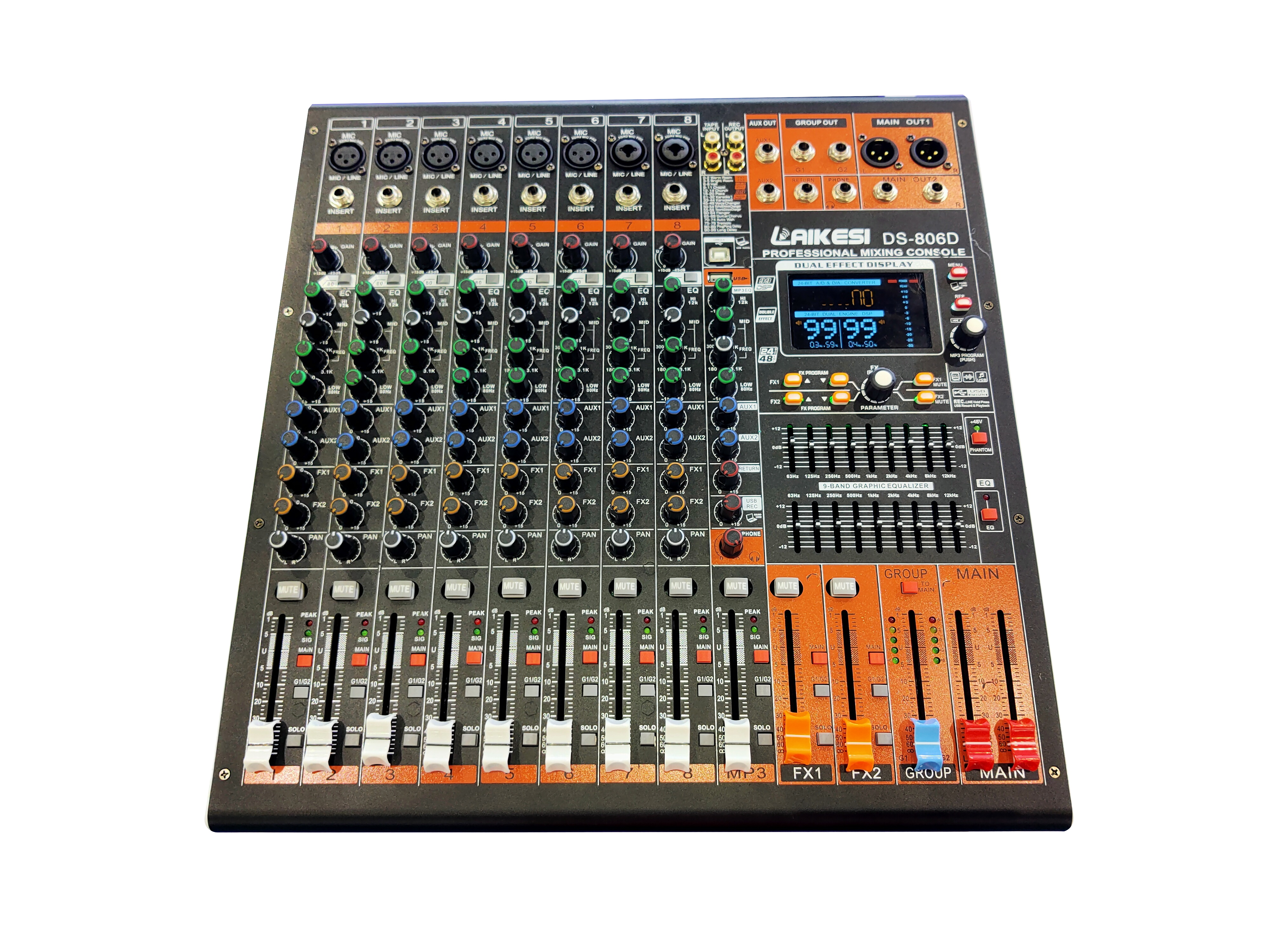
When shopping for equipment, you will generally encounter two main categories: analog and digital. Both have their place, but understanding the difference is key to making the right purchase.
Feature | Analog Mixer | Digital Mixer |
|---|---|---|
Interface | Physical knobs for every function. What you see is what you get. | Menus, screens, and layers. One knob might control multiple things. |
Sound Character | Often described as "warm" or "organic." | Clean, precise, and consistent. |
Recall | Manual. You have to take a photo of your settings to remember them. | Instant. You can save and load "scenes" or presets. |
Effects | Limited or requires external gear (unless it's a hybrid). | Extensive built-in effects libraries. |
Price | Generally more affordable for beginners. | Typically higher cost due to advanced tech. |
For many PC users, a hybrid approach works best—an analog-style interface that includes digital effects and USB connectivity.
Not all mixers are created equal. To ensure you get the best audio mixer for pc, keep an eye out for these specific specifications:
Microphone Preamps: This is what amplifies your mic signal. You want low-noise preamps that provide a clean sound.
Phantom Power (+48V): Essential if you plan to use condenser microphones, which are the standard for studio-quality voice recording.
Built-in Effects: Having reverb or delay directly on the board is a massive plus for musicians and vocalists.
EQ Controls: Look for at least a 3-band EQ (High, Mid, Low) to sculpt your sound.
Channel Count: Always buy a mixer with a few more channels than you think you need right now. It provides room to grow.
If you are looking for a robust solution that bridges the gap between usability and professional features, the EFX8 Professional Digital Audio Mixer from LAIKESI Audio is a standout option.
The EFX8 is designed for versatility, making it perfect for both live venues and desktop PC recording environments. Here is why this specific model is worth your attention:
One of the headline features of the EFX8 is the built-in 24-bit Lexicon digital effects processor. Lexicon is a legendary name in audio processing. Having that technology integrated means you get studio-grade reverb and delay without needing expensive external plugins. The unit comes with 32 effects settings, giving you plenty of creative room to find the perfect sound for your vocals or instruments.
The EFX8 offers a 12+2 channel frame size. This is more than enough for a complex streaming setup or a full band recording session. It features professional XLR-type and 1/4" metal jack connector sockets, ensuring durability and secure connections.
With a 3-band EQ with a swept mid on mono inputs, you have surgical control over your tone. The swept mid is particularly useful for vocalists, allowing you to find the exact frequency of your voice that needs boosting or cutting. Additionally, the ten-segment LED output metering ensures you can visually monitor your levels to prevent clipping (distortion).
Despite its professional features, the EFX8 is designed to be intuitive. It features a comprehensive solo system and a tap tempo function for effects. Plus, it is easily rack-mountable if you want to install it permanently in a studio desk.
Integrating a professional audio mixer into your computer setup is straightforward, but it requires the right cabling.
Connect Your Sources: Plug your microphones into the XLR inputs and your instruments into the line inputs of the EFX8.
Audio Output: The EFX8 has RCA phono record outputs and main XLR/Jack outputs. To get the sound into your PC, you will typically run cables from the mixer's "Main Out" or "Rec Out" into your computer's "Line In" port. Note: For the highest fidelity, many pros run the mixer outputs into a simple USB audio interface, which then plugs into the PC.
Monitoring: Plug your headphones into the mixer’s headphone output. This allows you to hear exactly what the mixer is doing with zero latency (delay).
PC Settings: On your computer, go to your sound settings and select "Line In" (or your USB interface) as your Input Device.
Great audio is about control and quality. Relying on software sliders and budget USB microphones can only take you so far. By upgrading to a hardware solution like the EFX8, you gain the ability to sculpt your sound, add professional effects in real-time, and manage multiple audio sources with ease.
Whether you are broadcasting to the world or recording your next hit song, a dedicated audio mixer for pc is the tool that elevates your production from amateur to professional.


